Als eigenaar van een WooCommerce-winkel kun je merken dat het beheren van meerdere klant- of leverancierswebsites op één gedeelde WordPress-server praktisch en budgetvriendelijk lijkt. De aanpak lijkt eenvoudig: betaal voor één hostingplan, beheer alle sites vanaf één dashboard en stroomlijnen facturering onder één account. Deze opstelling kan de workflow vereenvoudigen, onderhoudstaken verminderen en je controle geven over de prestaties en uptime van de site. Voor veel bureaus en freelancers voelt het als een schaalbare manier om terugkerend inkomen te genereren, terwijl het centrale beheer van alle klantsites behouden blijft.
However, beneath this convenient setup lies a complex set of risks often underestimated. When multiple sites share the same server, they also share its vulnerabilities, bandwidth, and resource limitations. A compromised or malfunctioning site can quickly affect others, potentially leading to downtime, data loss, or reputational damage. What may appear to be an efficient hosting solution can evolve into performance issues, client dissatisfaction, and security challenges. Understanding these potential dangers helps inform smarter, safer hosting decisions.
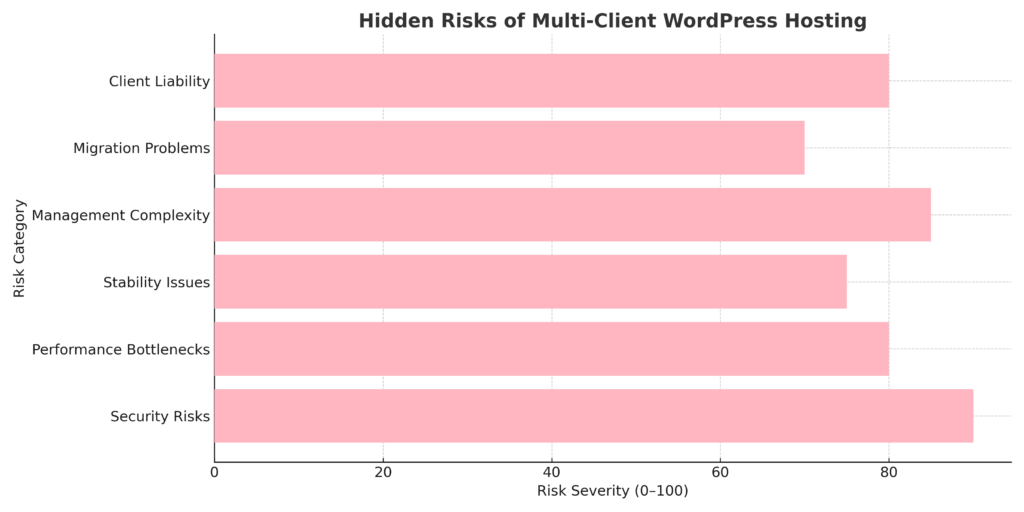
The graph illustrates common challenges that can occur when managing multiple sites on a shared server infrastructure. Security vulnerabilities are a significant concern, as a compromised plugin on one site may affect other sites sharing the same environment. Management complexity and performance issues also arise frequently, often stemming from the need to coordinate updates across multiple installations and manage shared server resources.
Aanvullende overwegingen zijn onder meer aansprakelijkheidsrisico van klanten, stabiliteitszorgen wanneer locaties concurreren om middelen, en de technische complexiteit van het migreren van locaties uit gedeelde omgevingen. De gegevens suggereren dat, hoewel multi-client hosting operationeel gemak kan bieden, deze uitdagingen sommige instanties hebben doen overwegen om geïsoleerde hostingomgevingen als alternatief te overwegen.
Op het eerste gezicht lijkt het hosten van meerdere WordPress-sites van klanten of leveranciers onder één hostingplan praktisch en efficiënt. Veel bureaus, freelancers en WooCommerce-winkeleigenaren voelen zich aangetrokken tot de eenvoud en de kostenbesparing. Het beheren van meerdere websites vanuit één dashboard kan minder gedoe, eenvoudiger onderhoud en minder inlogs betekenen. Het geeft een gevoel van controle en organisatie, waarbij alles wordt beheerd vanaf één centrale locatie door jou, als beheerder.
Beyond convenience, this setup can also serve as a predictable source of income and enhance operational efficiency for digital service providers. Combining hosting, maintenance, and support into a single package creates an appealing all-in-one offer for clients. On paper, it looks beneficial: simpler and easier for your clients, and potentially more profitable overall. But as you'll see, this convenience can come with complexities and risks that require careful consideration.
Veelvoorkomende voordelen zijn:
What seems like a simple and cost-effective solution can turn into a technical and managerial challenge. Hosting multiple client or vendor WordPress sites on one shared server means every website depends on the same pool of resources and the same layer of protection. A single mistake, a vulnerable plugin, poor code, or a sudden traffic spike can disrupt all sites simultaneously. Security breaches, downtime, and performance slowdowns can spread across multiple sites, affecting your clients' businesses and your reputation.
Deze onderling verbonden risico's maken multiclient hosting iets om voorzichtig aan te pakken. Kleine kwetsbaarheden kunnen uitgroeien tot grotere problemen, en probleemoplossing wordt complex wanneer er talrijke websites bij betrokken zijn. Hieronder staan zes belangrijke pijnpunten waar elke eigenaar en elk bedrijf van een WooCommerce-winkel en bureau rekening mee moet houden bij het beheren van meerdere sites onder één hostingparaplu.
Een enkele zwakke schakel kan de bredere omgeving in gevaar brengen wanneer meerdere WordPress-sites dezelfde hostingserver delen. Een enkele kwetsbare plugin, een verouderd thema of een geïnfecteerd bestand kan aanvallers toegang geven tot andere websites die op die server worden gehost. Deze onderling verbonden opstelling kan een kleine inbreuk veranderen in een breder beveiligingsprobleem.
Key risks include:
Multiple websites compete for performance when sharing server resources, CPU, RAM, storage, and bandwidth. One high-traffic or poorly optimized site can monopolize system resources, slowing down other sites hosted on that server. For WooCommerce stores, this can mean delayed checkouts, failed transactions, and frustrated customers during peak hours.
Belangrijke kwesties zijn onder andere:
Stability becomes fragile when multiple client websites share the same hosting account or server. A single update failure, plugin conflict, or PHP error can take down multiple sites under that account. Shared environments complicate troubleshooting, as a single misconfiguration or system overload can trigger cascading downtime across hosted sites.
Key concerns include:
Managing a single WordPress site is straightforward. But when you're juggling ten, twenty, or more client sites, management complexity can increase substantially. Each site typically has unique plugins, themes, schedules, and client requests. Simple maintenance tasks can become overwhelming without proper automation and centralized tools, and mistakes can multiply across all sites.
Veelvoorkomende managementuitdagingen zijn:
Migrating or separating sites from a shared or multisite WordPress environment is rarely simple. When all client sites live under one hosting account, dependencies become tangled, shared databases, plugins, or file structures make clean separation difficult. A single corrupted file or misconfigured plugin can stall migrations, risking data loss and extended downtime.
Common migration and exit challenges include:
When you take on hosting responsibilities for clients, you're not just offering space; you're promising reliability, performance, and security. You may be held accountable when things go wrong, even if the issue stems from a client's plugin choices or coding mistakes. Managing expectations becomes important because downtime or data loss can damage your reputation and client trust.
Veel bureaus onderschatten hoe veeleisend klanten kunnen worden zodra ze afhankelijk zijn van jouw hostingopzet. Ze verwachten vaak responsieve ondersteuning, snelle oplossingen en verantwoordelijkheid voor storingen of vertragingen, ongeacht wie ze heeft veroorzaakt. Zonder duidelijke voorwaarden kan dit een juridische of financiële last worden.
Key risks include:
When managing multiple WordPress or WooCommerce sites, success often comes from strategic planning. The goal is to help prevent a single issue from spiraling into a broader hosting problem. Investing in the right hosting setup and adopting systematic maintenance practices can help safeguard performance, maintain security, and satisfy your clients. Proper planning can help prevent costly downtime and strengthen your agency's reputation for reliability and professionalism.
Het kiezen van de juiste hostingbasis kan je multi-client WordPress-strategie beïnvloeden. In plaats van elke locatie in één gedeeld account te proppen, richt je je op het bouwen van veilige, geïsoleerde en schaalbare omgevingen. Een sterke architectuur kan prestatiestabiliteit, gemakkelijker beheer en sterkere bescherming tegen cascaderende storingen bieden.
Consider these hosting approaches:
Manual maintenance can become overwhelming when managing multiple WordPress or WooCommerce sites. Standardization and automation can keep your operations efficient, secure, and consistent. By using automated systems and unified standards, you can reduce human error, improve performance, and ensure every client site runs smoothly without constant manual oversight.
Key strategies include:
Isolation can be a strong defense when hosting multiple WordPress or WooCommerce sites. Segmentation and strict access control help prevent a single vulnerability or user mistake from spreading across all client environments. You can build a safer, more resilient multi-client setup by creating separation at every level: hosting, database, and user permissions.
Volg deze praktijken:
Issues can still occur regardless of how secure or optimized your setup is. A strong backup and recovery plan helps ensure your client sites stay safe and recoverable after any crash, hack, or data loss. The goal isn't just to back up, it's to restore quickly with minimal downtime and data loss.
Volg deze best practices:
Consistent monitoring is your early warning against performance drops, hacking attempts, and resource overload. In a multi-client WordPress setup, one neglected site can drag down others. Proactive tracking helps ensure each client site runs efficiently, stays secure, and uses only its fair share of server resources.
Key steps to implement:
Voordat je hosting- of onderhoudsdiensten aanbiedt, definieer duidelijk wat klanten kunnen verwachten en wat buiten jouw scope valt. Transparante overeenkomsten helpen misverstanden te voorkomen, aansprakelijkheid te verminderen en professionele grenzen te stellen. Het vooraf uiteenzetten van je verantwoordelijkheden beschermt je tijd, reputatie en gemoedsrust wanneer onverwachte locatieproblemen of klantverzoeken zich voordoen.
Key points to include:
Het beheren van meerdere WordPress- of WooCommerce-websites wordt steeds complexer naarmate je klantenbestand groeit. Elke site vereist updates, back-ups en prestatiemonitoring, wat aanzienlijke tijdsdruk kan creëren voor bureaus en freelancers. Gecentraliseerde beheertools kunnen deze workflows stroomlijnen door routinetaken te automatiseren en uniforme dashboards te bieden voor het monitoren van de sitegezondheid in je hele portfolio.

ManageWP biedt gecentraliseerde controle voor WordPress-professionals die meerdere klantsites beheren. Het platform consolideert dagelijkse onderhoudstaken in één dashboard, waardoor de tijd die nodig is om locaties bij te werken en te monitoren vermindert.
Key features:

UpdraftPlus biedt back-upfunctionaliteit en ondersteunt grote cloudopslagplatforms. De plugin biedt zowel handmatige als geplande back-upopties en bevat hersteltools die kunnen helpen bij het herstellen van sites wanneer er problemen optreden.
Key features:

Sucuri offers security monitoring and malware removal services through a cloud-based platform. The service includes firewall protection and can help identify and address security threats across client sites.
Key features:

MalCare focuses on automated malware detection and removal from a centralized dashboard. The plugin is designed for multi-site management, with scanning that typically runs with minimal impact on the server.
Key features:

WP Rocket is a caching plugin that can help improve page load times through various optimization techniques. The plugin works with WooCommerce sites and includes several performance features that activate upon installation.
Key features:
Performance and reliability are particularly important for WooCommerce store owners sharing hosting with other sites. A single slowdown or resource issue can affect sales and customer trust. Focus on optimizing your environment to help ensure your store remains fast, secure, and resilient, even if other client sites on the server experience traffic spikes or technical issues.
Consistency, monitoring, and thoughtful optimization can make a difference. Keep your store lightweight, protect your checkout flow, and ensure customers enjoy a smooth shopping experience from start to finish. A well-maintained WooCommerce site can help improve conversions and minimize downtime.
Belangrijke best practices zijn onder meer:
Het hosten van meerdere WordPress- of WooCommerce-sites van klanten op één server kan helpen de initiële kosten te verlagen, maar de mogelijke afwegingen moeten worden overwogen. Beveiligingslekken, concurrentie op middelen en beheercomplexiteit kunnen efficiëntie omzetten in mogelijke uitvaltijd, datalekken of ontevredenheid van klanten. Wat op een kosteneffectieve aanpak lijkt, kan een onderhoudslast worden als deze niet goed wordt beheerd.
When properly configured, automation tools and clear client agreements can help address these challenges and support stability and growth. Isolated hosting environments, routine monitoring, and proactive maintenance can help reduce risks while supporting consistent site performance.
Effective hosting involves more than cutting costs; it includes building reliable, trustworthy infrastructure that can scale. Whether you manage hosting in-house or partner with a specialized provider, consider these principles: focus on robust security, define clear boundaries between client environments, and invest in infrastructure that can adapt as your agency grows.