Running a WordPress hosting business means your clients depend on you to keep their eCommerce stores performing well. Site health issues can affect search rankings, customer trust, and sales conversions. Understanding what to monitor and how to address common problems helps maintain successful online businesses.
WordPress powers a substantial portion of websites globally, with eCommerce stores representing a notable segment of that ecosystem. These sites face unique challenges often requiring proactive monitoring and maintenance to prevent revenue-impacting downtime or performance issues.
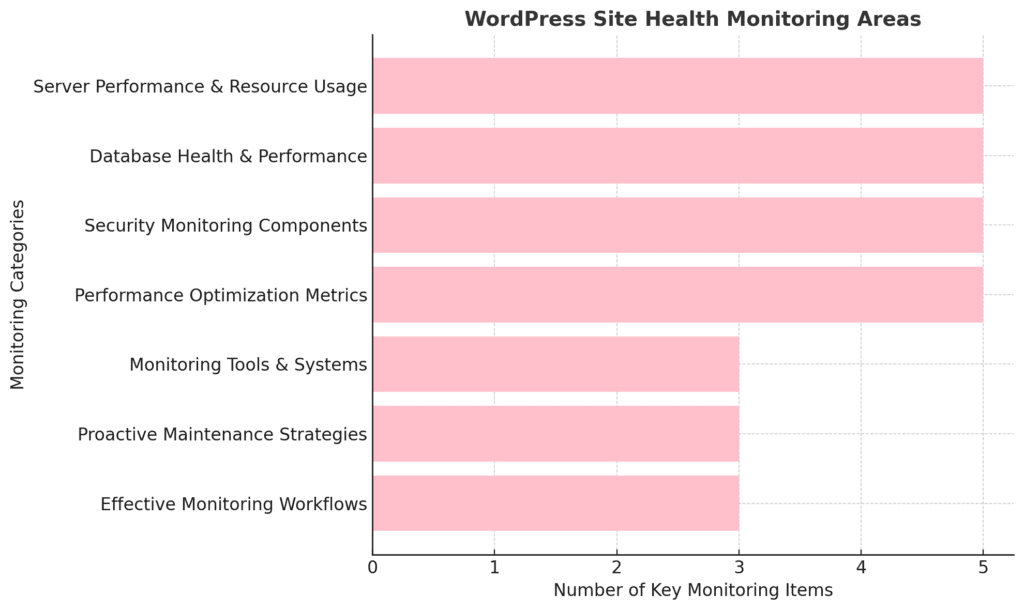
The monitoring landscape highlights key categories hosting providers should track to maintain WordPress site health. It emphasizes server performance, database stability, security components, and performance optimization, all of which can affect speed, reliability, and vulnerability protection. It also underscores the importance of monitoring tools, proactive maintenance, and structured workflows, which help ensure issues are identified early and handled consistently. Together, these areas provide a comprehensive framework for keeping WordPress sites secure, efficient, and resilient over time.
Understanding WordPress Site Health: The Foundation
WordPress introduced its Site Health feature in version 5.2, providing administrators and hosting providers with built-in diagnostic tools. This system evaluates various aspects of a WordPress installation and provides recommendations for improvements.
The Site Health screen checks areas including PHP version compatibility, database performance, plugin conflicts, and security configurations. For hosting providers, this can provide valuable insight into potential issues before they become client-facing problems.
Modern WordPress installations generate health data that hosting providers may be able to leverage for proactive support. Rather than waiting for clients to report problems, you can potentially identify and address issues early.
Core Areas Hosting Providers Should Monitor
WordPress hosting requires vigilant monitoring across multiple technical domains. Each area presents unique challenges that can impact site performance, security, and user experience. By establishing comprehensive monitoring protocols, hosting providers can identify potential issues before they affect client operations and revenue.
Server Performance and Resource Usage
Server resources form the foundation of WordPress performance, and monitoring these metrics helps prevent common issues such as slow load times, timeouts, and site crashes. Resource consumption patterns often reveal underlying problems with site configuration, plugin efficiency, or traffic spikes that require attention.
- CPU Usage Pattern Analysis: Track sustained high CPU usage that may indicate inefficient database queries, poorly coded plugins, or the need for caching optimization across client sites
- Memory Consumption Alerts: Monitor RAM usage approaching allocated limits, especially for sites with extensive plugin ecosystems or large media libraries that could cause fatal errors
- Disk Space Utilization Tracking: Watch for rapid storage growth from uploads, backups, logs, and database expansion that could lead to service interruptions
- Network Bandwidth Monitoring: Identify unusual traffic spikes or sustained high bandwidth consumption that might indicate DDoS attacks or viral content spreading
- Process Resource Management: Track WordPress processes that consume excessive resources or run longer than expected, which can impact overall server performance.
Database Health and Performance
WordPress relies heavily on database operations, making database health important for site performance and reliability. Database issues often manifest as slow page loading, failed transactions, or complete site unavailability, making proactive monitoring valuable for maintaining client satisfaction.
- Query Performance Optimization: Monitor slow-running database queries that exceed acceptable response times, often due to missing indexes or inefficient plugin code.
- Database Growth Trend Analysis: Track database expansion patterns to predict storage needs and identify tables requiring optimization or cleanup procedures
- Connection Pool Management: Monitor database connection limits to prevent "too many connections" errors during traffic spikes or resource-intensive operations.
- Table Corruption Detection: Use database tools to perform regular integrity checks and identify and repair corrupted tables before data loss occurs.
- Replication Status Monitoring: For sites using database replication, track synchronization status to help ensure backup databases remain current and accessible
Security Monitoring Components
WordPress security threats evolve constantly, requiring continuous monitoring to protect client sites from malware, unauthorized access, and data breaches. Early detection of security issues can help prevent costly cleanup efforts and protect client reputations from damage.
- Login Attempt Pattern Analysis: Track failed login attempts, unusual access patterns, and brute force attack indicators across all client WordPress installations
- File Integrity Verification: Perform regular hash comparisons of core WordPress files to detect unauthorized modifications or attempts at malware injection.
- Vulnerability Database Tracking: Monitor security bulletins and vulnerability databases for issues affecting installed plugins, themes, and WordPress core versions.
- Suspicious File Detection Systems: Scan for unexpected PHP files, modified timestamps, or unusual file permissions that may indicate security compromises
- Access Log Security Analysis: Review server access logs for suspicious requests, SQL injection attempts, or unusual bot activity patterns targeting WordPress sites
Performance Optimization Metrics
Site performance can impact user experience, conversion rates, and search engine rankings. Comprehensive performance monitoring helps identify optimization opportunities and ensures that sites meet modern speed expectations, delivering optimal business results.
- Page Load Speed Assessment: Track loading times across different page types and user scenarios, typically aiming for sub-3-second load times for optimal engagement
- Core Web Vitals Monitoring: Monitor Google's key performance metrics, including Largest Contentful Paint, First Input Delay, and Cumulative Layout Shift scores
- Cache Performance Analysis: Track caching effectiveness across different layers, including browser cache, CDN cache, and server-side caching systems
- Image Optimization Tracking: Monitor image compression ratios and modern format adoption to identify opportunities for bandwidth reduction and speed improvements
- Third-Party Script Impact: Analyze the performance impact of external scripts, tracking pixels, and widgets on overall page loading speed and user experience
Monitoring Tools and Systems
WordPress site health monitoring requires the right tools and systems to gather, analyze, and act on performance data. The monitoring landscape includes native WordPress tools, third-party solutions, and custom implementations that each serve specific purposes in maintaining site health.
WordPress Native Health Tools
WordPress includes built-in diagnostic capabilities that provide immediate insights without requiring additional software installations. These native tools offer hosting providers a foundation for site health monitoring, though they may have limited scope and automation capabilities compared to dedicated solutions.
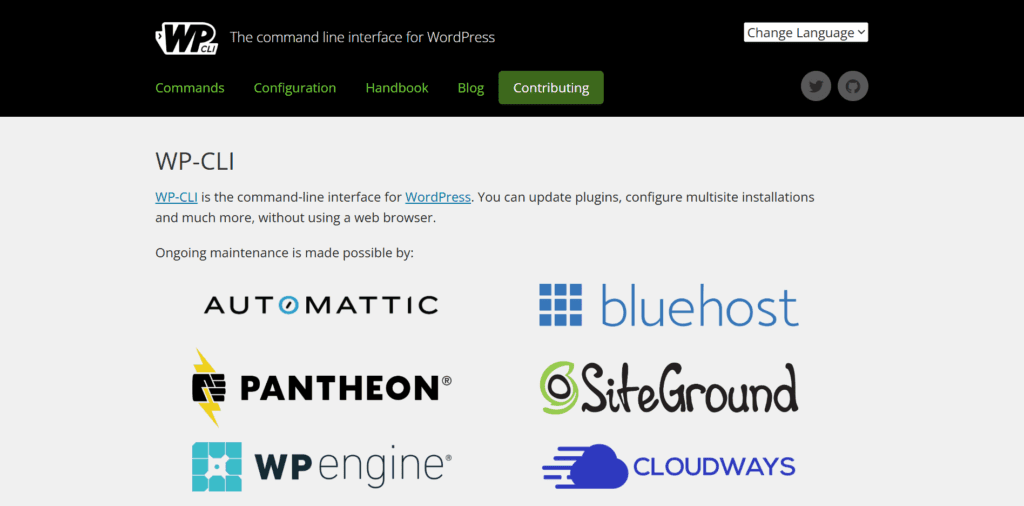
- Site Health Dashboard Integration: Utilize the built-in WordPress Site Health screen to assess PHP version compatibility, database performance, scheduled tasks, and plugin conflicts
- WP-CLI Automation Implementation: Deploy
wp site health commands for automated health checks across multiple WordPress installations, enabling efficient large-scale monitoring
- Debug Logging Configuration: Enable WordPress debug logging strategically to capture plugin conflicts and PHP errors while managing log file sizes to prevent storage issues
- Scheduled Task Verification: Monitor WordPress cron job execution through native tools to help ensure automated tasks like backups and updates run correctly
- Plugin Conflict Detection: Use WordPress native diagnostic tools to identify compatibility issues that may not be apparent through external monitoring systems

Third-Party Monitoring Solutions
Professional monitoring platforms provide comprehensive insights beyond WordPress's native capabilities, offering advanced analytics, alerting systems, and integration with hosting infrastructure. These solutions require configuration and may involve costs, but provide enterprise-level monitoring capabilities.
- Application Performance Monitoring: Deploy tools like New Relic or DataDog to track detailed application performance, database queries, and resource usage patterns
- Uptime Monitoring Services: Implement external monitors that check site availability every few minutes and provide immediate alerts when a site becomes inaccessible.
- Security Scanning Integration: Configure automated security scanners to perform regular malware detection and vulnerability assessments across client sites
- Infrastructure Monitoring Tools: Use server monitoring to track CPU usage, memory consumption, disk I/O, and network performance at the system level.
- Synthetic Transaction Testing: Implement monitoring that simulates user interactions like login processes and checkout procedures to detect functional issues
Custom Monitoring Implementations
Tailored monitoring solutions address specific hosting provider needs that standard tools may not cover. Custom implementations require development resources but can provide monitoring capabilities aligned with unique hosting environments and client requirements.
- Log Analysis System Development: Create custom log-parsing solutions to analyze WordPress access, error, and application logs for patterns indicating emerging problems.
- Automated Backup Verification: Build systems that automatically test backup restoration processes during low-traffic periods to verify data recovery capabilities
- Custom Alerting Framework Creation: Develop notification systems triggering alerts when specific thresholds are exceeded, such as resource spikes or unusual traffic patterns
- Database Health Monitoring Tools: Implement custom database monitoring to track query performance, table optimization needs, and WordPress-specific growth patterns.
- Performance Baseline Tracking: Develop systems establishing performance baselines for each site and alerting when metrics deviate from normal parameters
Proactive Maintenance Strategies
Proactive maintenance can help prevent issues before they impact client sites, potentially reducing support requests and maintaining optimal performance. Maintenance strategies often combine regular updates, database optimization, and performance enhancements to keep WordPress sites running smoothly.
Regular Update Management
WordPress updates provide security patches, performance improvements, and new features, but require careful planning to prevent compatibility issues. Systematic update management helps maintain site security while minimizing disruption to client operations.
- WordPress Core Update Scheduling: Establish consistent update schedules for WordPress core releases, prioritizing security patches while allowing time for compatibility testing
- Plugin Update Testing Protocols: Implement staging-environment testing for all plugin updates before applying them to production sites, and document any compatibility issues and rollback procedures.
- Theme Update Compatibility Checks: Test theme updates in staging environments to identify potential conflicts with customizations or plugins before production deployment
- PHP Version Migration Planning: Plan PHP version upgrades systematically, testing compatibility with existing WordPress installations, and addressing deprecated function calls
- Update Rollback Procedures: To help ensure quick recovery if issues occur, maintain comprehensive rollback procedures and fresh backups before applying updates.
Database Optimization Procedures
WordPress databases accumulate data over time that can impact performance if not properly maintained. Regular optimization helps maintain query performance and prevents database bloat from affecting site speed and resource usage.
- Database Cleanup Automation: Remove unnecessary data, including spam comments, post revisions, expired transients, and orphaned metadata, to help improve database performance
- Index Optimization Management: Rebuild and optimize database indexes regularly to help improve query performance, especially for sites with high content turnover
- Table Structure Optimization: Perform table optimization operations during maintenance windows to defragment tables and reclaim unused space
- Backup System Verification: Test backup restoration processes regularly to help ensure data protection systems function correctly when recovery is needed
- Query Performance Analysis: Monitor slow query logs and optimize problematic queries through index additions or plugin configuration changes
Technical Note: When implementing WP-CLI health checks across multiple sites, you may encounter permission issues with shared hosting environments. Consider running checks in the appropriate user context and handling timeouts for resource-intensive scans.
Implementation Challenge: Database optimization on shared hosting can be problematic during peak hours. Consider implementing maintenance windows and rollback procedures before performing optimization operations.
Performance Enhancement Activities
Performance optimization requires ongoing attention to maintain fast loading speeds as sites grow and evolve. Regular performance enhancement activities help sites meet user expectations and search engine requirements.
- Image Optimization Automation: Implement automated image compression and modern format conversion to reduce bandwidth usage without noticeable quality loss
- Content Delivery Network Management: Configure and optimize CDN settings to help improve global site performance and reduce origin server load.
- Caching System Optimization: Fine-tune caching configurations across all layers, including browser cache, page cache, and object cache, for maximum effectiveness
- Code Optimization Reviews: Regularly audit custom code, plugin selections, and theme optimizations to identify performance improvement opportunities
- Third-Party Service Optimization: Review and optimize external service integrations like analytics, advertising, and social media widgets to minimize performance impact
Creating Effective Monitoring Workflows
Structured monitoring workflows help ensure consistent oversight of WordPress sites while efficiently using hosting provider resources. Workflows often combine automated monitoring with human analysis to provide comprehensive site health management.
Daily Monitoring Tasks
Daily monitoring catches immediate issues and can help prevent minor problems from escalating into major outages. These routine checks form the foundation of proactive WordPress hosting management.
- Server Resource Utilization Checks: Review CPU, memory, and disk usage across all servers to identify sites experiencing unusual resource consumption
- Backup System Status Verification: Confirm backup processes completed successfully and verify backup integrity to maintain data protection systems
- Security Scan Result Analysis: Review automated security scan results to identify new threats, malware infections, or vulnerability exposures requiring attention
- Site Availability Confirmation: Check uptime monitoring alerts and verify sites remain accessible to users and search engines
- Performance Metric Review: Monitor key performance indicators, including page load speeds and Core Web Vitals scores for changes
Weekly Analysis Activities
Weekly analysis provides deeper insights into site health trends and identifies optimization opportunities that may not be apparent in daily monitoring. These activities can help maintain long-term site performance and stability.
- Performance Trend Analysis: Review performance metrics over the past week to identify sites showing declining performance or optimization opportunities
- Database Health Assessment: Analyze database performance metrics, query execution times, and growth patterns to plan optimization activities
- Plugin and Theme Update Review: Identify available updates for plugins and themes, assess compatibility risks, and plan update deployment schedules
- Security Audit Procedures: Conduct comprehensive security reviews, including file integrity checks, user account audits, and access log analysis
- Client Communication Preparation: Compile site health reports and performance summaries for client communication and account management activities
Monthly Strategic Reviews
Monthly reviews focus on long-term trends and strategic planning to help ensure that hosting services continue to meet client needs as sites grow and evolve. These comprehensive analyses guide infrastructure planning and service improvements.
- Capacity Planning Analysis: Analyze resource usage trends and growth patterns to predict future infrastructure needs and plan hardware upgrades
- Security Posture Assessment: Conduct comprehensive security audits, including vulnerability assessments, compliance reviews, and incident response procedure testing
- Client Site Health Reporting: Generate detailed health reports for clients showing proactive maintenance activities and site performance improvements
- Infrastructure Optimization Planning: Review server configurations, resource allocation, and service offerings to identify optimization opportunities
- Technology Stack Evaluation: Assess current monitoring tools, hosting technologies, and service processes for potential upgrades or replacements
Building Long-Term Site Health Management
Implementing comprehensive WordPress site health monitoring requires systematic planning and appropriate tools. Start by evaluating your current monitoring capabilities and identifying areas where additional oversight might benefit your clients.
Consider implementing automated monitoring solutions that can track the key metrics discussed in this guide. Many hosting providers find that proactive monitoring can help reduce support requests while potentially improving client satisfaction.
Remember that monitoring is an ongoing process that requires regular refinement. As WordPress evolves and new challenges emerge, your monitoring strategies should adapt accordingly. Focus on providing genuine value through proactive maintenance and clear communication about your steps to keep client sites performing well.
When selecting monitoring tools and implementing workflows, consider starting with the most impactful areas for your client base. Server performance and security monitoring often provide immediate benefits, while more advanced features, such as custom alerting, can be added as your monitoring capabilities mature.
The investment in comprehensive site health monitoring typically pays dividends through reduced emergency support requests, improved client retention, and the ability to identify optimization opportunities before they become performance bottlenecks.