Running an ecommerce store means every second your site takes to load is a second a potential customer is reconsidering. Page speed, uptime, and security are no longer just technical considerations. They have a measurable impact on conversions, ad spend efficiency, and search rankings. For many small business owners, the hosting decision gets made once at launch and is rarely revisited. That's worth reconsidering because the gap between basic shared hosting and modern managed cloud infrastructure has widened considerably over the last few years.
AI-powered hosting is one of the more practical developments in this space. Rather than requiring you to monitor server performance, manually scale resources, or react to security incidents after the fact, these platforms handle much of that automatically. This article breaks down what that actually means in practice, what to look for when evaluating providers, and how to tell whether your current hosting setup may be holding your store back.
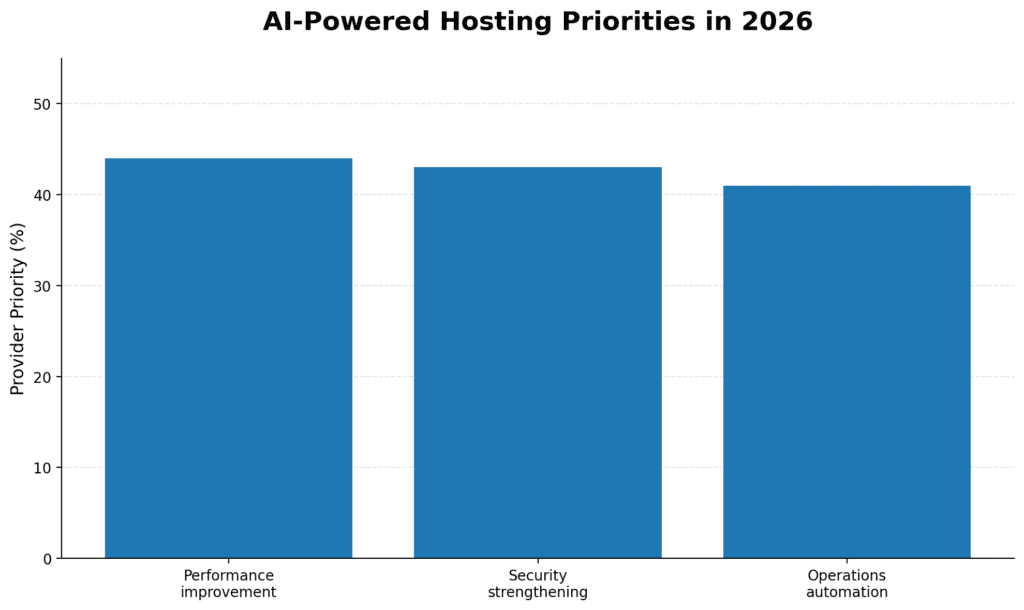
For many managed hosting environments, AI-powered capabilities are shifting from optional add-ons to standard performance infrastructure. The value is not just in the "AI" label, but in automation that can improve speed, detect threats earlier, scale resources during traffic spikes, and reduce manual troubleshooting overhead. This matters because Google's Core Web Vitals continue to focus on real user experience, including LCP under 2.5 seconds and INP under 200 milliseconds.
For businesses, the practical takeaway is this: hosting is no longer just storage and uptime. It is becoming an automated performance layer that can affect conversions, SEO visibility, customer trust, and operational efficiency.
According to Portent's load time research, pages exceeding 3 seconds may see elevated bounce rates, and the relationship between load speed and cart abandonment is well documented across ecommerce studies. For small business owners managing inventory, marketing, and customer service, server performance often gets deprioritized until it becomes a problem.
That's where AI-powered hosting can make a measurable difference. Rather than requiring constant manual configuration, these systems automatically monitor, adjust, and protect your site. It's not a universal solution, but for ecommerce stores with unpredictable traffic and limited technical resources, it's worth understanding what's actually changed.
The term gets used broadly, so it's worth being specific. AI-powered hosting refers to hosting environments in which machine learning systems handle tasks that traditionally required manual intervention or simply didn't occur at all. The practical applications fall into a few key areas.
Traditional shared hosting gives your site a fixed allocation of CPU and memory. If a flash sale or a viral post drives a traffic spike, performance can degrade, and your store may go down entirely. AI-driven hosting environments monitor traffic patterns continuously and can scale resources up during high-demand periods, then scale back when traffic normalizes.
This can be particularly useful for seasonal businesses. A store selling holiday gifts doesn't need the same server resources in February as it does in December. Intelligent auto-scaling can help you avoid both overpaying during slow months and getting caught underpowered during your busiest ones, though it's worth confirming with any provider exactly how their scaling thresholds work and whether it's truly dynamic or a manual upgrade process with an automated trigger.
Standard caching stores static versions of your pages so they load faster for repeat visitors. AI-assisted caching goes a step further by analyzing browsing behavior to anticipate which pages a visitor is likely to view next and preloading them in the background. For product catalog pages and checkout flows, this can reduce perceived load times without requiring manual configuration. Implementation quality varies considerably among providers, so it's worth asking how a given platform's predictive layer works before assuming a guaranteed performance gain. Actual results also vary depending on your store's traffic patterns and how the caching layer is implemented.
AI-driven hosting platforms can identify performance bottlenecks, slow database queries, unoptimized images, scripts that delay page rendering, and, in some cases, apply fixes automatically. Even when fixes aren't automatic, receiving alerts with specific recommendations is more actionable than a generic slow-site warning. Industry studies suggest that improvements in Core Web Vitals scores can correlate with gains in organic search visibility over time. However, the relationship varies depending on the competitive landscape and how your pages are currently performing.
Automated attacks frequently target ecommerce stores. Credential stuffing, brute-force login attempts, card-testing fraud, and DDoS attacks are ongoing risks for any store that processes real transactions. Traditional security tools operate on rule sets: block traffic that matches a known pattern. The limitation is that attack patterns often change faster than rule sets get updated.
AI-based security monitoring works differently. It establishes a baseline of normal traffic for your specific site and flags deviations from it in real time. A wave of bot traffic that doesn't match typical shopping behavior can often be identified and blocked earlier in the process, rather than after the fact.
Security capabilities in AI-powered hosting environments typically include:
No security system is foolproof, but moving from purely reactive protection to systems that can identify emerging threats often reduces the window of vulnerability. It's worth asking any provider specifically what their monitoring covers and how alerts are surfaced to you.
Google has made Core Web Vitals an explicit ranking factor, which means your hosting infrastructure has a direct line to your organic search performance. The three metrics that matter most are Largest Contentful Paint (how quickly the main content loads), Interaction to Next Paint (how responsive the page feels to user input), and Cumulative Layout Shift (how stable the page layout is during load). Google publishes the specific thresholds for each metric in its Core Web Vitals documentation, which is worth bookmarking as a reference point.
AI-managed hosting can help on all three fronts. Faster server response times can improve LCP scores. Intelligent script management and deferral can improve INP. Proper image handling and resource prioritization can reduce layout instability. The degree of improvement depends on your current baseline, what platform you're running, and where your existing bottlenecks actually are. Stores moving from legacy shared hosting to AI-optimized infrastructure often see measurable gains. Still, it's worth running PageSpeed Insights on your key pages before and after any migration to confirm what's actually changing.
Beyond rankings, there's a conversion case. Faster load times generally correlate with lower cart abandonment rates, particularly on mobile, where connections are less reliable. Even modest improvements in mobile load time can influence purchase completion rates, though the effect size varies considerably by store, audience, and existing load time baseline.
Unplanned downtime can be costly. Even a 30-minute outage during a promotion can result in lost orders, damaged customer trust, and wasted ad spend. AI-powered hosting environments can offer improved uptime reliability through a couple of mechanisms.
Predictive maintenance is one. By analyzing server health data across large infrastructure networks, AI systems can often identify hardware or configuration issues before they cause failures, reroute traffic, or require proactive component replacement. This operates at a scale that manual monitoring generally can't match.
The other is faster incident response. When issues occur, automated systems can detect and respond within seconds, rather than waiting for a human to notice an alert, investigate, and take action. For stores running paid traffic, faster recovery can directly reduce the cost of any outage event, making uptime SLA terms worth reviewing carefully before committing to a provider.
AI-powered hosting is often not the cheapest option upfront. The more useful question is whether the total value justifies the cost when you account for:
For stores currently patching together performance with a stack of plugins on basic shared hosting, an AI-managed environment can sometimes reduce overall complexity while improving results. That said, the "AI-powered" label doesn't guarantee a specific outcome. It's worth asking any provider exactly what AI capabilities are included at your plan tier, how they document performance improvements, and what happens during a traffic spike that exceeds their auto-scaling thresholds.
There's a lot of noise in this market right now. Some providers offer more advanced infrastructure management; others apply the label to fairly basic automation. A few questions worth asking before committing:
It depends on where your current bottlenecks are. If you're on basic shared hosting and experiencing slow load times, frequent downtime, or security issues, AI-managed hosting can offer meaningful improvements without requiring deep technical expertise. For stores with low traffic volume and no active performance complaints, the upgrade may not be urgent. The better starting point is running a PageSpeed Insights test to confirm where your current gaps actually are.
A properly executed migration typically does not negatively impact rankings. In some cases, improved server response times and Core Web Vitals scores from better hosting can contribute to ranking improvements over time. The key is handling the migration carefully. If redirects, DNS propagation, or downtime windows aren't managed correctly, those issues can offset any performance gains from the new infrastructure.
Standard managed hosting typically means a team handles server maintenance, updates, and backups on a scheduled basis. AI-powered hosting adds continuous, real-time monitoring and automated decision-making, scaling resources during traffic spikes, detecting security anomalies, and adjusting caching behavior based on live usage patterns rather than static rules. The distinction matters most during unexpected events such as traffic spikes or emerging security threats, where the response-time difference between automated and human-reviewed systems can be significant.
Generally, no. AI-powered hosting improvements happen at the infrastructure level, below your storefront and plugins. You typically keep your existing theme, apps, and configurations. Some providers do offer platform-specific optimizations worth enabling, but they don't require rebuilding your store. That said, hosting improvements alone won't compensate for application-layer issues, a slow theme, or excessive plugin load, which will still affect performance regardless of what the server is doing.
AI-based security monitoring can help detect and respond to DDoS attacks, brute-force login attempts, credential stuffing, card testing bots, and malware injection. It works by identifying traffic and behavior patterns that deviate from your site's established baseline, rather than relying solely on fixed rule sets that may not account for newer attack methods. It's a meaningful layer of protection, but it works best alongside good application-level practices, keeping WordPress core, themes, and plugins updated, using strong authentication, and limiting unnecessary admin access.
Two free tools give you a solid starting point: Google PageSpeed Insights (run it on your homepage and a key product page) and the Core Web Vitals report in Google Search Console. If your LCP score is consistently above 2.5 seconds or your mobile performance scores are in the red, hosting infrastructure is often a contributing factor. However, it's worth ruling out theme bloat, unoptimized images, and plugin conflicts before assuming hosting is the primary cause.
Server-side improvements, such as faster response times and Core Web Vitals gains, can often be measured within days of a completed migration. SEO ranking improvements, if they occur, typically take longer. Industry estimates generally range from a few weeks to a few months, depending on how frequently Google recrawls your pages and the competitive landscape for your keywords. Track Core Web Vitals in Search Console before and after migration to establish a clean baseline for comparison.
Even with AI-managed infrastructure handling server-level performance, security, and scaling, the plugin stack still matters at the application layer. The plugins below address caching, image optimization, security hardening, uptime monitoring, and database health, with server-level and application-level tools working in parallel rather than in isolation. Each has meaningful tradeoffs depending on your hosting environment, technical comfort level, and store configuration. They're organized by category for easier reference.
WP Rocket is a premium caching plugin for WordPress and WooCommerce. It activates core performance improvements at installation without requiring complex configuration, making it practical for store owners who aren't developers. The trade-off is cost: it's a paid plugin, and it can conflict with server-level caching in some managed hosting environments. Hence, it's worth confirming compatibility with your host before purchasing.
LiteSpeed Cache is a free, server-level caching plugin that delivers its best performance on LiteSpeed Web Server environments. On compatible infrastructure, it operates below the PHP layer, which can reduce Time to First Byte compared to PHP-based alternatives. On non-LiteSpeed servers, many of its core advantages don't apply; in those cases, it functions as a standard application-layer cache.
NitroPack is a cloud-based performance plugin that handles caching, code optimization, and image delivery through an external service rather than directly on your server. It can reduce configuration overhead for stores running resource-heavy page builders or themes. The cloud-based model introduces an external dependency, and pricing scales with traffic volume, which can be a factor for higher-traffic stores.
Perfmatters is a lightweight script management plugin designed to complement, rather than replace, a caching plugin. It focuses on disabling unnecessary WordPress features and reducing HTTP requests on a per-page or per-post basis, which is useful for ecommerce stores where different page types have different script requirements. It requires some familiarity with which scripts each page actually needs; misconfiguration can break functionality.
W3 Total Cache is a long-standing free caching plugin with extensive configuration options for stores on managed or VPS hosting environments. Its range of integration options makes it worth evaluating for more complex setups. The configuration depth that makes it flexible also makes it less suited to users who want a low-touch setup. Misconfigured settings can cause caching conflicts on WooCommerce stores.
If your store is on basic shared hosting and you haven't evaluated alternatives in the last two to three years, the most useful first step is to run a Google PageSpeed Insights test on your key pages and review your Core Web Vitals data in Google Search Console. These free tools will show you whether hosting infrastructure is a limiting factor in your current performance or whether the bottlenecks are elsewhere, such as theme code, plugin conflicts, unoptimized images, or third-party scripts.
If speed and uptime are confirmed pain points, evaluating managed hosting providers with AI-driven capabilities is a reasonable next step. By most industry benchmarks, the performance gap between commodity shared hosting and well-managed cloud infrastructure has widened. For stores where site performance has a confirmed impact on revenue, the investment can justify itself over time, though results vary by traffic volume and migration quality. Request demos or trial periods from two or three providers before committing. Most reputable managed hosting companies will give you enough access to evaluate real performance rather than just marketing claims.