Most WooCommerce store owners have encountered it at some point: a checkout that hesitates, a payment that fails without explanation, or a customer who abandons at the final step. In many cases, the payment gateway is not the source of the problem. The underlying hosting environment is. Server latency, limited PHP workers, database slowdowns, or poorly configured caching can quietly disrupt checkout and result in lost orders.
Hosting is the foundation on which an entire store operates. When it is slow, under-resourced, or improperly secured, even a well-configured payment gateway can struggle. This article explains how WooCommerce hosting affects transaction speed, uptime, and payment security, and what to evaluate when building a checkout experience that converts consistently.
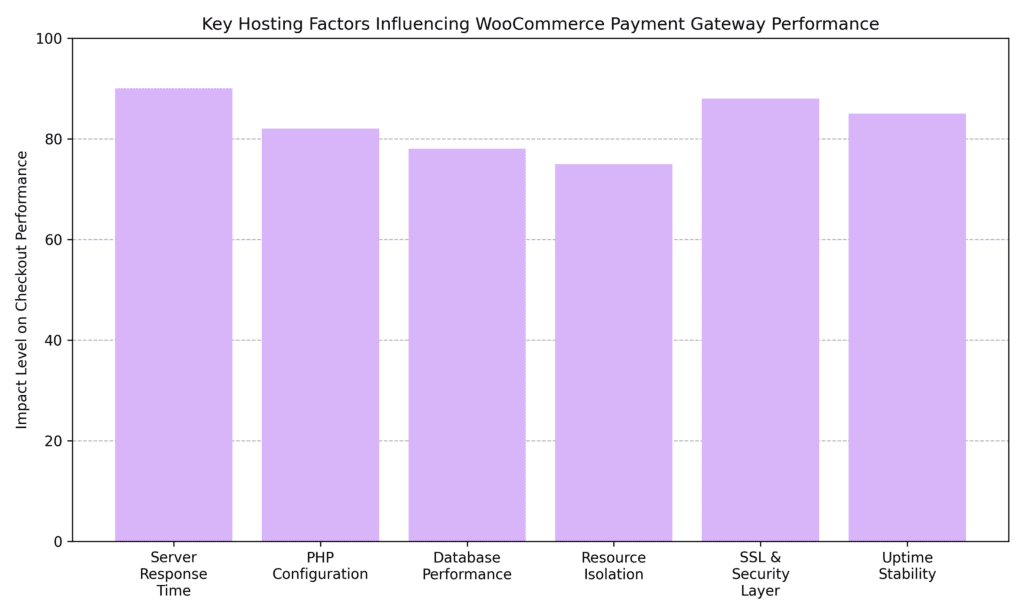
Payment gateway performance in WooCommerce is primarily shaped by the hosting infrastructure rather than the gateway itself. Server response time, SSL security, uptime stability, and PHP configuration play large roles in transaction speed and reliability. As stores scale, hosting quality increasingly becomes a factor in conversion rates, payment success rates, and customer trust.
Many store owners treat hosting and payment processing as entirely separate decisions. Select a host, install WooCommerce, connect Stripe or PayPal, and assume the pieces will work together cleanly. Sometimes they do. Often, they fall short of optimal performance.
A payment gateway facilitates communication between a store, the customer's bank, and the payment processor. That communication depends on the server's ability to execute fast, reliable outbound API calls, process PHP requests without bottlenecks, and maintain a secure environment that meets industry standards. When a host cannot deliver on those fundamentals, the gateway absorbs the consequences as slow load times, failed transactions, and dropped connections at checkout.
Checkout speed has a measurable relationship with revenue. Abandonment rates typically rise when checkout pages take longer than two to three seconds to load. By the time a customer reaches the payment step, the buying decision has already been made. Slow scripts, heavy plugins, or underpowered hosting can create friction that translates into lost sales.
WooCommerce runs on PHP, and the PHP version and server configuration directly affect checkout load speed. Older PHP versions tend to process requests more slowly and can cause compatibility conflicts with payment gateway plugins. A reasonable starting threshold for PHP memory is 256 MB, though more complex stores may require additional memory. When that limit is reached, PHP typically returns errors rather than completing the checkout process.
When a customer clicks "Place Order," the server must send a request to the payment gateway's API, receive a response, and update the order database, all within milliseconds. In a shared hosting environment overloaded with competing sites, each of those steps can slow down. Managed WooCommerce hosting providers typically isolate server resources so stores do not compete with dozens of other sites for CPU and RAM, resulting in faster API response times and a smoother checkout experience.
One factor that often goes unexamined is the physical distance between a store's server and the payment processor's data centers. Stripe and PayPal operate primary infrastructure in the United States and Europe. When a store's server is geographically distant from those endpoints, every API call during checkout carries additional round-trip latency. On underpowered hosting where response times are already marginal, geographic distance can compound the delay.
Stores serving a concentrated customer base may benefit from hosting in a data center close to both their customers and their payment processor's nearest endpoint. A CDN can reduce front-end asset latency, but the gateway API call still originates from the origin server, making server location a real, if often overlooked, variable in checkout speed.
Every completed transaction writes data to the WooCommerce database. On a well-configured server, this happens quickly. On a poorly tuned shared server, write operations can queue up, causing checkout to stall before payment confirmation reaches the customer. Hosting environments using NVMe SSD storage alongside properly configured MySQL or MariaDB databases tend to handle concurrent transactions more efficiently. A practical maintenance step: keeping the wp_options table clear of excess autoloaded data can help prevent database queries from slowing down as a store ages.
Payment security is where the connection between the hosting provider and the payment gateway becomes most significant. Even with a trusted gateway in place, server-level vulnerabilities such as outdated software, weak firewall rules, poor access controls, or misconfigured SSL can expose sensitive transaction data.
Every WooCommerce payment gateway requires an active SSL certificate. SSL encrypts data exchanged between the customer's browser and the server, preventing sensitive information from being intercepted in transit. A lapsed certificate is one of the more common and preventable causes of sudden checkout failures. Beyond the technical requirement, customers look for the padlock in their browser at checkout. Without it, many will not complete a purchase regardless of product quality.
Store owners often assume that using a hosted gateway like Stripe or PayPal resolves all PCI DSS compliance obligations. That is partially accurate, but the hosting environment still carries responsibility. Servers need secure configurations, up-to-date software, and proper data protection measures. A host that does not provide regular security patching, malware scanning, or server-level firewall protection can leave a store vulnerable even when the gateway itself meets compliance requirements.
A web application firewall (WAF) sits between a site and incoming traffic, filtering out malicious requests before they reach the WooCommerce installation. Without one, a store is more exposed to brute-force attacks, SQL injection attempts, and credential stuffing. Many managed WooCommerce hosting providers include WAF protection as part of the package. Plugin-level tools like Wordfence or Sucuri offer meaningful coverage, but server-level protection typically intercepts threats earlier in the request chain.
When a site goes down mid-checkout, the transaction fails, customer confidence is damaged, and the sale is lost. Hosting with a guaranteed uptime SLA of 99.9% or better is a reasonable baseline for any store processing live transactions. Payment gateways themselves tend to be highly redundant. Hosting is typically the greater source of downtime risk.
Not every hosting environment is built for transactional workloads. WooCommerce checkout is dynamic, database-driven, and reliant on real-time API communication with payment gateways. Hosting for an active store should prioritize processing power, database efficiency, and security rather than basic page delivery alone.
Selecting a hosting provider involves more than comparing storage or monthly costs. Transactional reliability should be part of the evaluation. When reviewing a provider, focus on technical capabilities that directly affect how quickly and securely checkout communicates with payment gateways.
Even with solid hosting in place, payment gateway performance can suffer when store-level configuration is not optimized. Small inefficiencies from unnecessary plugins, bloated themes, or untested updates can introduce delays that affect conversion rates.
A clean, distraction-free checkout page reduces cognitive load and keeps customers moving toward payment. Unnecessary scripts, banners, or pop-ups add resources the server must load before the customer reaches the payment form. Reviewing the checkout flow periodically from a customer's perspective, including guest checkout availability, clearly labeled fields, and mobile layout, can help reduce friction. One often-overlooked issue: confirming the checkout page is not inadvertently cached by the caching layer, which can cause cart contents to behave unexpectedly.
Heavy themes loaded with unnecessary JavaScript and CSS can slow down a checkout page even on fast hosting. A lightweight theme built for WooCommerce performance, paired with regular plugin audits, can reduce page load time and minimize conflicts with the payment gateway. Fewer active plugins also mean a smaller attack surface from a security standpoint.
Waiting for a customer complaint to surface a checkout problem is a reactive approach worth avoiding. Using a staging environment to test gateway updates before pushing them live is a reliable way to catch regressions early. Periodic load tests show how checkout performs under real traffic conditions. Tools like Google PageSpeed Insights and GTmetrix can help identify server response issues and front-end bottlenecks. Run them in a fresh browser session, without cached data, to get an accurate picture of what new customers experience.
Setting up cart abandonment tracking through Google Analytics or a WooCommerce-specific analytics plugin gives visibility into where customers drop off. Spikes in abandonment at the payment step can be early indicators of a hosting performance issue or a gateway configuration problem. Identifying those patterns early typically leads to faster resolution and fewer lost sales.
Many WooCommerce checkout complaints that store owners attribute to their payment gateway are actually hosting issues. Slow checkout pages, intermittent payment failures, and SSL errors at the payment step are rarely caused by Stripe or PayPal, as those services maintain substantial infrastructure redundancy. The failure point is more often on the store side of the connection.
For stores processing regular transactions, hosting should be a deliberate, researched decision. The cost difference between budget shared hosting and managed WooCommerce hosting is real, but so are the revenue implications when checkout performance is unreliable.
Solid hosting is the foundation, but the right plugins can help keep checkout fast, secure, and conversion-focused. Below are five WooCommerce-compatible plugins that directly or indirectly affect checkout speed, transaction stability, and security.
A premium caching plugin that can improve front-end performance without disrupting dynamic WooCommerce pages when configured correctly. After setup, verify that the WooCommerce exclusion rules are active. Cart, checkout, and account pages should be excluded from caching by default, but confirming this after installation helps prevent issues down the line.
Delivers server-level caching when paired with LiteSpeed hosting, which can improve response times and API communication during checkout. On other hosts, the plugin still provides optimization benefits, though full performance gains depend on server compatibility.

Can help improve server efficiency by reducing load time and optimizing resource delivery. Requires more configuration than WP Rocket but gives experienced users granular control over caching behavior at the database, object, and browser levels.
Stores database query results in memory, reducing the need for repeated database calls during checkout sessions. Particularly useful for stores with high session volume or complex product catalogs. Redis must be enabled at the server level, so confirm support with the hosting provider before installation.
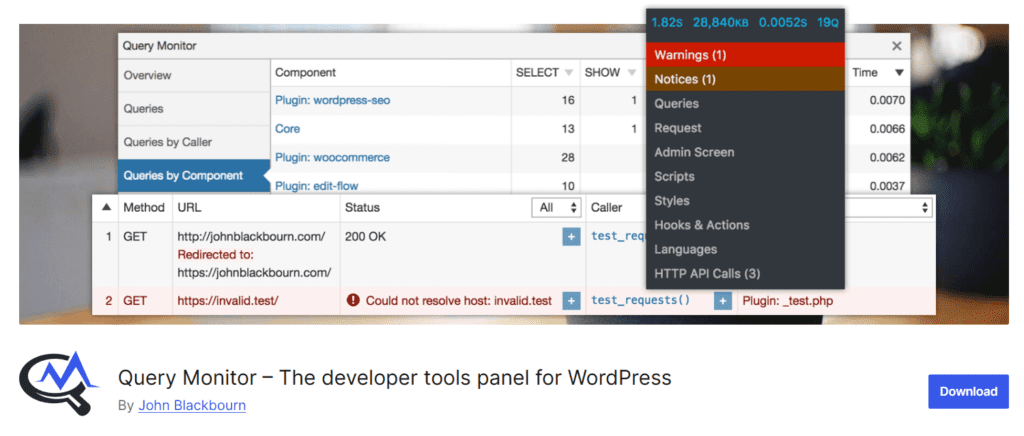
A diagnostic tool that can help identify slow database queries or PHP errors disrupting checkout or payment gateway communication. Well-suited for pinpointing where a bottleneck originates before applying a fix.
A payment gateway is only as reliable as the hosting environment supporting it. High response times, database bottlenecks, or misconfigured caching can disrupt checkout flows and cause transactions to fail or be delayed. Stripe and PayPal maintain substantial infrastructure redundancy. When transactions fail or checkout stalls, the failure point is almost always on the store side of the connection. PHP memory limits, slow database writes, an expired SSL certificate, or a server struggling under shared resource contention are the typical culprits. Adjusting gateway settings rarely resolves what is fundamentally a hosting problem.
When hosting and gateway configuration are properly aligned, the results tend to show up in the metrics that matter: faster checkout page load times, fewer abandoned carts at the payment step, lower transaction failure rates, and stronger data protection throughout the session. For stores processing regular transactions, hosting is not a background infrastructure decision. It is a direct input to revenue. Evaluating it with the same care applied to gateway selection, plugin choices, and checkout UX is what often separates stores that convert consistently from those that quietly lose sales to problems they never trace back to the server.