As a WooCommerce store owner, you may find that managing multiple client or vendor websites on one shared WordPress server appears practical and budget-friendly. The approach seems straightforward: pay for a single hosting plan, handle all sites from one dashboard, and streamline billing under one account. This setup can simplify workflow, reduce maintenance tasks, and give you control over site performance and uptime. For many agencies and freelancers, it feels like a scalable way to generate recurring income while maintaining centralized management of all client sites.
However, beneath this convenient setup lies a complex set of risks often underestimated. When multiple sites share the same server, they also share its vulnerabilities, bandwidth, and resource limitations. A compromised or malfunctioning site can quickly affect others, potentially leading to downtime, data loss, or reputational damage. What may appear to be an efficient hosting solution can evolve into performance issues, client dissatisfaction, and security challenges. Understanding these potential dangers helps inform smarter, safer hosting decisions.
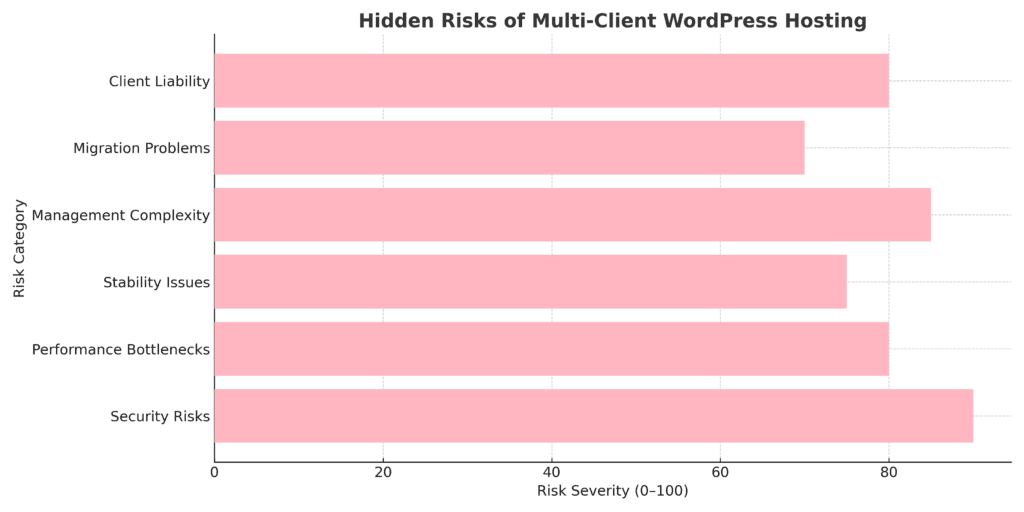
The graph illustrates common challenges that can occur when managing multiple sites on a shared server infrastructure. Security vulnerabilities are a significant concern, as a compromised plugin on one site may affect other sites sharing the same environment. Management complexity and performance issues also arise frequently, often stemming from the need to coordinate updates across multiple installations and manage shared server resources.
Additional considerations include client liability exposure, stability concerns when sites compete for resources, and the technical complexity of migrating sites out of shared environments. The data suggest that, while multi-client hosting can offer operational convenience, these challenges have led some agencies to consider isolated hosting environments as an alternative.
At first glance, hosting multiple client or vendor WordPress sites under a single hosting plan seems practical and efficient. Many agencies, freelancers, and WooCommerce store owners are drawn to its simplicity and cost savings. Managing several websites from one dashboard can mean less hassle, easier maintenance, and fewer logins to juggle. It provides a sense of control and organization, with everything managed from a single central location by you, as the administrator.
Beyond convenience, this setup can also serve as a predictable source of income and enhance operational efficiency for digital service providers. Combining hosting, maintenance, and support into a single package creates an appealing all-in-one offer for clients. On paper, it looks beneficial: simpler and easier for your clients, and potentially more profitable overall. But as you'll see, this convenience can come with complexities and risks that require careful consideration.
Common benefits include:
What seems like a simple and cost-effective solution can turn into a technical and managerial challenge. Hosting multiple client or vendor WordPress sites on one shared server means every website depends on the same pool of resources and the same layer of protection. A single mistake, a vulnerable plugin, poor code, or a sudden traffic spike can disrupt all sites simultaneously. Security breaches, downtime, and performance slowdowns can spread across multiple sites, affecting your clients' businesses and your reputation.
These interconnected risks make multi-client hosting something to approach carefully. Small vulnerabilities can escalate into larger problems, and troubleshooting becomes complex when numerous websites are involved. Below are six major pain points that every WooCommerce store owner and agency should consider when running multiple sites under a single hosting umbrella.
A single weak link can compromise the broader environment when multiple WordPress sites share the same hosting server. A single vulnerable plugin, an outdated theme, or an infected file can give attackers access to other websites hosted on that server. This interconnected setup can turn a minor breach into a broader security problem.
Key risks include:
Multiple websites compete for performance when sharing server resources, CPU, RAM, storage, and bandwidth. One high-traffic or poorly optimized site can monopolize system resources, slowing down other sites hosted on that server. For WooCommerce stores, this can mean delayed checkouts, failed transactions, and frustrated customers during peak hours.
Key issues include:
Stability becomes fragile when multiple client websites share the same hosting account or server. A single update failure, plugin conflict, or PHP error can take down multiple sites under that account. Shared environments complicate troubleshooting, as a single misconfiguration or system overload can trigger cascading downtime across hosted sites.
Key concerns include:
Managing a single WordPress site is straightforward. But when you're juggling ten, twenty, or more client sites, management complexity can increase substantially. Each site typically has unique plugins, themes, schedules, and client requests. Simple maintenance tasks can become overwhelming without proper automation and centralized tools, and mistakes can multiply across all sites.
Common management challenges include:
Migrating or separating sites from a shared or multisite WordPress environment is rarely simple. When all client sites live under one hosting account, dependencies become tangled, shared databases, plugins, or file structures make clean separation difficult. A single corrupted file or misconfigured plugin can stall migrations, risking data loss and extended downtime.
Common migration and exit challenges include:
When you take on hosting responsibilities for clients, you're not just offering space; you're promising reliability, performance, and security. You may be held accountable when things go wrong, even if the issue stems from a client's plugin choices or coding mistakes. Managing expectations becomes important because downtime or data loss can damage your reputation and client trust.
Many agencies underestimate how demanding clients can become once they rely on your hosting setup. They often expect responsive support, quick fixes, and accountability for outages or slowdowns, regardless of who caused them. Without clear terms, this can turn into a legal or financial burden.
Key risks include:
When managing multiple WordPress or WooCommerce sites, success often comes from strategic planning. The goal is to help prevent a single issue from spiraling into a broader hosting problem. Investing in the right hosting setup and adopting systematic maintenance practices can help safeguard performance, maintain security, and satisfy your clients. Proper planning can help prevent costly downtime and strengthen your agency's reputation for reliability and professionalism.
Choosing the right hosting foundation can help impact your multi-client WordPress strategy. Instead of cramming every site into a single shared account, focus on building secure, isolated, and scalable environments. A strong architecture can provide performance stability, easier management, and stronger protection against cascading failures.
Consider these hosting approaches:
Manual maintenance can become overwhelming when managing multiple WordPress or WooCommerce sites. Standardization and automation can keep your operations efficient, secure, and consistent. By using automated systems and unified standards, you can reduce human error, improve performance, and ensure every client site runs smoothly without constant manual oversight.
Key strategies include:
Isolation can be a strong defense when hosting multiple WordPress or WooCommerce sites. Segmentation and strict access control help prevent a single vulnerability or user mistake from spreading across all client environments. You can build a safer, more resilient multi-client setup by creating separation at every level: hosting, database, and user permissions.
Follow these practices:
Issues can still occur regardless of how secure or optimized your setup is. A strong backup and recovery plan helps ensure your client sites stay safe and recoverable after any crash, hack, or data loss. The goal isn't just to back up, it's to restore quickly with minimal downtime and data loss.
Follow these best practices:
Consistent monitoring is your early warning against performance drops, hacking attempts, and resource overload. In a multi-client WordPress setup, one neglected site can drag down others. Proactive tracking helps ensure each client site runs efficiently, stays secure, and uses only its fair share of server resources.
Key steps to implement:
Before offering hosting or maintenance services, clearly define what clients can expect and what falls outside your scope. Transparent agreements help prevent misunderstandings, reduce liability, and set professional boundaries. Outlining your responsibilities upfront protects your time, reputation, and peace of mind when unexpected site issues or client demands arise.
Key points to include:
Managing multiple WordPress or WooCommerce websites becomes increasingly complex as your client base expands. Each site requires updates, backups, and performance monitoring, which can create significant time demands for agencies and freelancers. Centralized management tools can help streamline these workflows by automating routine tasks and providing unified dashboards for monitoring site health across your entire portfolio.
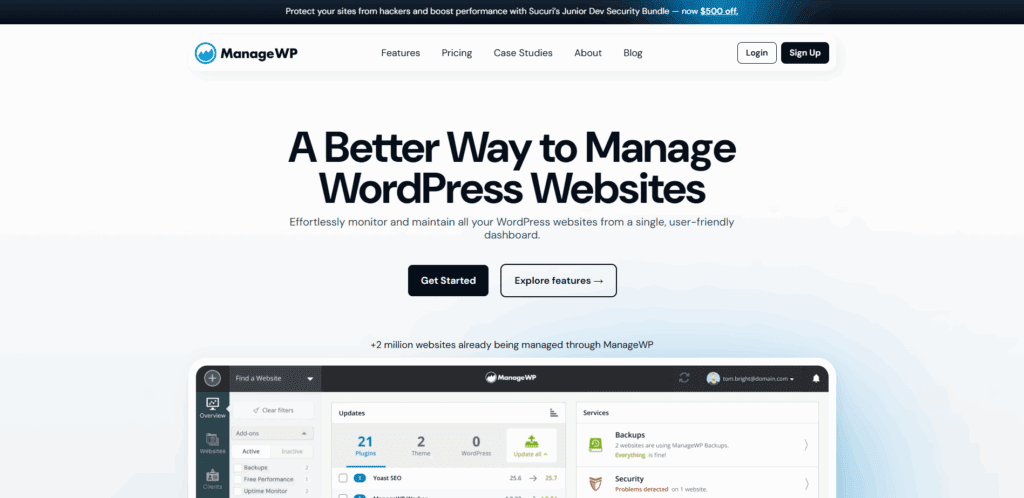
ManageWP offers centralized control for WordPress professionals managing multiple client sites. The platform consolidates everyday maintenance tasks into a single dashboard, reducing the time needed to update and monitor sites.
Key features:
UpdraftPlus provides backup functionality and supports major cloud storage platforms. The plugin offers both manual and scheduled backup options and includes restoration tools that can help recover sites when issues occur.
Key features:
Sucuri offers security monitoring and malware removal services through a cloud-based platform. The service includes firewall protection and can help identify and address security threats across client sites.
Key features:
MalCare focuses on automated malware detection and removal from a centralized dashboard. The plugin is designed for multi-site management, with scanning that typically runs with minimal impact on the server.
Key features:
WP Rocket is a caching plugin that can help improve page load times through various optimization techniques. The plugin works with WooCommerce sites and includes several performance features that activate upon installation.
Key features:
Performance and reliability are particularly important for WooCommerce store owners sharing hosting with other sites. A single slowdown or resource issue can affect sales and customer trust. Focus on optimizing your environment to help ensure your store remains fast, secure, and resilient, even if other client sites on the server experience traffic spikes or technical issues.
Consistency, monitoring, and thoughtful optimization can make a difference. Keep your store lightweight, protect your checkout flow, and ensure customers enjoy a smooth shopping experience from start to finish. A well-maintained WooCommerce site can help improve conversions and minimize downtime.
Key best practices include:
Hosting multiple client WordPress or WooCommerce sites on one server may help reduce initial costs, but the potential trade-offs should be considered. Security vulnerabilities, resource competition, and management complexity can turn efficiency into potential downtime, data breaches, or client dissatisfaction. What appears to be a cost-effective approach may become a maintenance burden when not managed properly.
When properly configured, automation tools and clear client agreements can help address these challenges and support stability and growth. Isolated hosting environments, routine monitoring, and proactive maintenance can help reduce risks while supporting consistent site performance.
Effective hosting involves more than cutting costs; it includes building reliable, trustworthy infrastructure that can scale. Whether you manage hosting in-house or partner with a specialized provider, consider these principles: focus on robust security, define clear boundaries between client environments, and invest in infrastructure that can adapt as your agency grows.