Running an ecommerce store on WordPress means your hosting is more than just a place to park your files. It’s the infrastructure your entire business runs on. When a customer tries to check out, and your page loads slowly or throws an error, they leave and often don’t come back.
The challenge is that most hosting plans are marketed with specs that don’t always translate to real-world performance for an online store. Storage limits and bandwidth numbers look impressive, but they don’t tell you much about what happens during a flash sale or a plugin update gone wrong.
This guide breaks down the hosting features that tend to matter for small ecommerce businesses on WordPress and explains what to look for when comparing options.
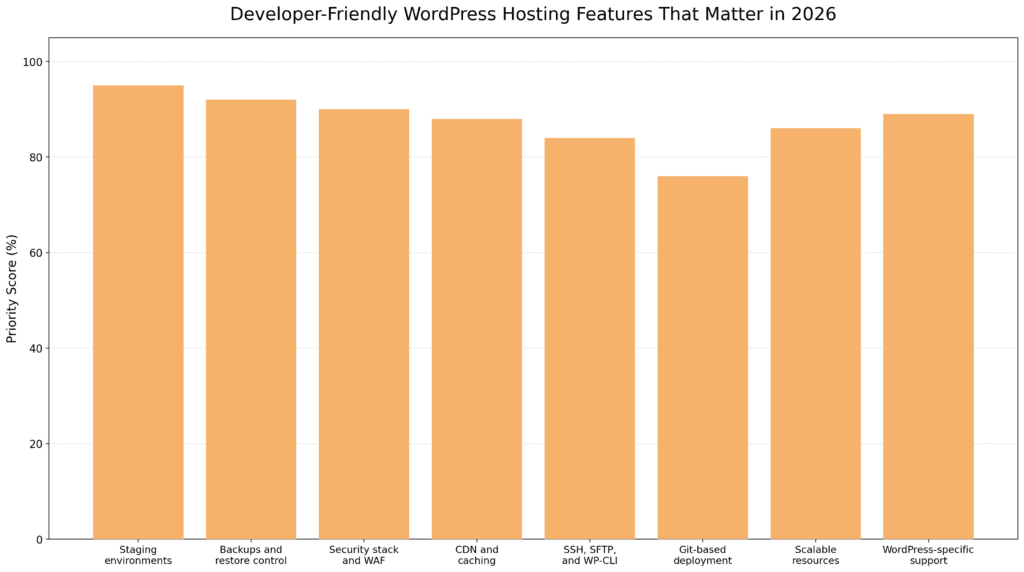
In 2026, the most useful developer-friendly WordPress hosting features for online stores are the ones that reduce risk and keep sales moving: staging for safe testing, reliable backups, strong security, CDN and caching for speed, developer access tools, scalable resources, and WordPress-aware support. For WooCommerce stores, these features often matter more than headline storage limits because they can directly affect checkout stability, update safety, and day-to-day store performance.
Shared hosting, where your site lives on a server alongside hundreds of other websites, can work fine for simple blogs or brochure sites. Ecommerce is different. WooCommerce stores generate more database queries, handle real-time inventory checks, process payment requests, and often run multiple plugins simultaneously.
Research from the Baymard Institute has linked slower page load times to higher cart abandonment rates. Shared hosting environments may struggle to maintain consistent response times when traffic spikes, neighboring sites on the same server consume excess resources, or your store runs resource-intensive operations like bulk order exports or inventory syncs.
That doesn’t mean shared hosting is always the wrong choice, but the tradeoffs are worth understanding before a busy season reveals the problem.
Caching reduces the number of database queries your server has to process by storing ready-to-serve versions of your pages. Many managed WordPress hosts include server-level caching tools, which can be more consistent than relying entirely on caching plugins, particularly under heavy traffic or when multiple concurrent sessions hit the same product pages.
PHP version support also tends to matter more than many store owners realize. Running PHP 8.x can offer noticeable performance improvements over older versions, according to benchmarks available at php.net. In controlled environments, real-world gains will vary depending on your store’s configuration. Check that your host lets you select and update your PHP version without opening a support ticket. On some plans, this requires manual escalation, which adds unnecessary friction and can leave your store running on a PHP version that’s no longer receiving security updates.
A CDN distributes your site’s static files (images, scripts, stylesheets) across servers in multiple geographic locations. When a visitor in another region loads your store, those files load from a nearby server rather than your origin server, which can help reduce load times.
Many managed WordPress hosts include CDN integration, either built in or available as an add-on. For stores serving customers across multiple regions, CDN coverage is often worth the additional cost, even when it’s not included by default.
SSD storage reads and writes data faster than traditional hard drives. Most reputable hosts have moved to SSD infrastructure, but it’s worth confirming. For WooCommerce stores with large product catalogs and frequent database activity, storage speed can affect overall page performance, particularly for catalog pages that pull from large product tables.
If you work with a developer, freelancer, or agency on your store, the tools your host provides can make their work faster and lower-risk. Some hosts restrict access behind support tickets or premium tiers. Others include these tools across all plans.
SSH (Secure Shell) gives a developer direct command-line access to your hosting environment. SFTP is the secure version of FTP for file transfers. Together, these allow your developer to work efficiently without going through a web-based file manager.
Hosts that lock SSH access behind higher-tier plans add friction to technical tasks your developer needs to perform regularly. Look for hosts that include SSH and SFTP access as standard features rather than paid upgrades.
WP-CLI is a command-line interface for WordPress that lets developers run bulk operations, manage plugins and themes, execute database queries, and automate repetitive tasks from the terminal. It’s a standard tool for developers managing WordPress professionally. For WooCommerce stores specifically, it’s useful for tasks such as bulk updating product meta, running a database search-and-replace after a domain migration, or regenerating thumbnails after a theme change.
If your developer uses WP-CLI and your host doesn’t support it, tasks that could run in seconds end up being done manually. Most developer-oriented managed hosts include WP-CLI preconfigured across all plans. It’s reasonable to verify this before committing to a host.
For stores that go through regular development and update cycles, Git-based deployment workflows can help reduce the risk of pushing untested changes to a live site. Some managed hosts offer Git integration or connect to services like GitHub or Bitbucket for version-controlled deployments.
This is more advanced infrastructure and may not be necessary for every small store, but it’s worth knowing whether your host supports it if your development process becomes more complex over time.
A staging environment is a copy of your live site where you can test changes, plugin updates, theme modifications, or new features before pushing them to production. Without staging, every change goes directly to the site your customers see.
For ecommerce stores, this tends to matter most when updating WooCommerce core, installing a new payment plugin, or modifying checkout flows. A staging environment lets you catch conflicts or errors before they affect a real transaction. It’s also useful for testing third-party integrations, shipping rate calculators, inventory sync plugins, or CRM connectors, where a failed update can silently break order processing.
Many managed WordPress hosts now include one-click staging as a standard feature. If your current host requires you to duplicate your site to manually test changes, that workflow gap is worth factoring into your evaluation.
A practical note: staging environments are only useful if your team actually uses them. Making it a standard step before any plugin update or theme change is a habit worth building, regardless of what your host offers.
Most hosts include automated backups, but the quality and coverage can vary. For an ecommerce store, it’s worth asking how often backups run, how long they are retained, and whether database changes are captured reliably. You should also check whether restores are simple, fast, and included in the plan. A solid backup setup can help protect orders, customer records, product data, and site changes, particularly during updates, migrations, plugin conflicts, or unexpected downtime.
For a store processing regular orders, it’s worth treating backups as part of your business continuity planning rather than just a line item in a hosting feature list.
Developer-focused managed hosts typically include some combination of malware scanning, firewalls, SSL support, server monitoring, and automatic updates. These features can help reduce risk, but they should not replace good store practices on your end.
Automatic SSL is now a baseline expectation for any reputable host. If a host still charges separately for basic SSL, that’s a red flag.
One thing to keep in mind: hosting-level security features reduce exposure but don’t replace good practices on your end, such as keeping plugins updated, using strong credentials, and limiting admin access to the users who actually need it. For WooCommerce stores specifically, it’s also worth auditing which third-party plugins have access to payment or customer data, which is a common vector for compromise that no host-level firewall can fully protect against.
An ecommerce store’s traffic is rarely flat. Seasonal promotions, product launches, or an unexpected social media mention can bring traffic spikes that strain shared hosting resources.
Managed WordPress hosts often handle scaling differently from standard shared hosts. Some offer automatic resource scaling during traffic surges, while others provide clear upgrade paths between plans without requiring a full site migration. It’s worth asking specifically how a host handles unexpected spikes and what the upgrade process looks like if you need to move quickly. A useful follow-up question: Does scaling occur automatically, or do you need to contact support first?
You don’t need to over-provision for peak traffic every day, but knowing your options before you need them is generally less stressful than figuring them out mid-promotion.
For a small ecommerce business, support quality can matter as much as technical specs. A host that takes 24 to 48 hours to resolve a checkout issue during an active sale period is a poor fit, regardless of their uptime SLA.
Developer-friendly managed hosts often differentiate on support by employing WordPress-specific technical staff rather than generalist agents. Some managed hosts go further by offering hands-on assistance as part of their service, allowing the support team to collaborate on actual technical problems rather than just pointing you to documentation.
When evaluating a host, look at reviews specifically around support response times and the technical depth of responses. Marketing language around “24/7 support” doesn’t tell you much about quality. A few specific things worth testing before you commit: whether pre-sales questions get substantive technical answers, and whether the support team can explain how their platform handles WooCommerce-specific issues like session handling or transactional email delivery.
Not every small ecommerce store needs enterprise-grade managed hosting from day one. The decision typically depends on traffic volume, order volume, revenue impact, technical requirements, and the level of hands-on support the business needs. A smaller store may start with reliable shared or managed WooCommerce hosting, then consider upgrading as performance, security, and uptime requirements grow. If slow pages, checkout issues, or downtime start affecting sales, that’s often a signal that a stronger hosting plan may be worth evaluating.
Factors worth considering:
A simple store with moderate traffic and infrequent updates may do well on a quality-managed shared or entry-level managed WordPress plan. A store running regular promotions, weekly flash sales, a seasonal catalog with 500-plus SKUs, or consistent daily order volume under active development will typically benefit from dedicated managed infrastructure.
One common pattern worth noting: stores often stay on under-resourced plans longer than they should, usually because migrating feels complicated. Many managed WordPress hosts offer free migration assistance, which can significantly reduce that friction.
Choosing a hosting provider is about more than server resources. For ecommerce stores, the right host can simplify development workflows, improve performance, strengthen security, and help reduce the risk of downtime. Below are five hosting providers commonly considered by WordPress and WooCommerce store owners, along with features that often make them a good fit for developers and growing online businesses.
Bright Hosting offers managed WordPress hosting for WooCommerce stores, agencies, and businesses that need reliable performance with developer-accessible tools.
Features:
Cloudways offers a flexible managed cloud hosting platform that lets users deploy WordPress on major cloud providers, with more granular control over server configuration than typical managed hosts.
Features:
Kinsta is a premium managed WordPress hosting provider built on Google Cloud infrastructure, known for strong performance and developer-oriented features.
Features:

SiteGround provides WordPress hosting that balances affordability, performance, and user-friendly management tools, with entry-level plans accessible for smaller stores.
Features:
WP Engine offers managed WordPress hosting with a strong focus on security, performance optimization, and development workflows.
Features:
If you’re not sure whether your current hosting is keeping up with your store’s needs, a few things are worth checking: average page load time using a tool like Google PageSpeed Insights or GTmetrix, whether your host provides staging and self-service backups, and whether your developer has the access they need without filing requests for standard tools.
If you’re evaluating a new host, prioritize the quality of WordPress-specific support and the availability of staging environments over raw storage numbers. For ecommerce stores, those operational features tend to matter more in day-to-day management than headline specs.
Bright Hosting offers managed WordPress hosting built with WooCommerce stores in mind, including staging environments, daily backups, developer access tools, and support from a team that works in WordPress every day. If you’d like to walk through your current setup to see whether it’s a fit, feel free to reach out.